

I started reading Sentry’s Toolkit repo to see what they were doing for AI agents. I ended up going through six repositories, their docs and their commit histories.
They’re building quite a bit: an MCP server, a CLI, skills for coding agents, plugins, a code reviewer, even a Slack agent runtime. A lot of it is open source.
I think this is great work. If you’re a developer or founder figuring out how agents should use your product, there’s a lot here to learn from. Let’s go through it.
MCP + CLI
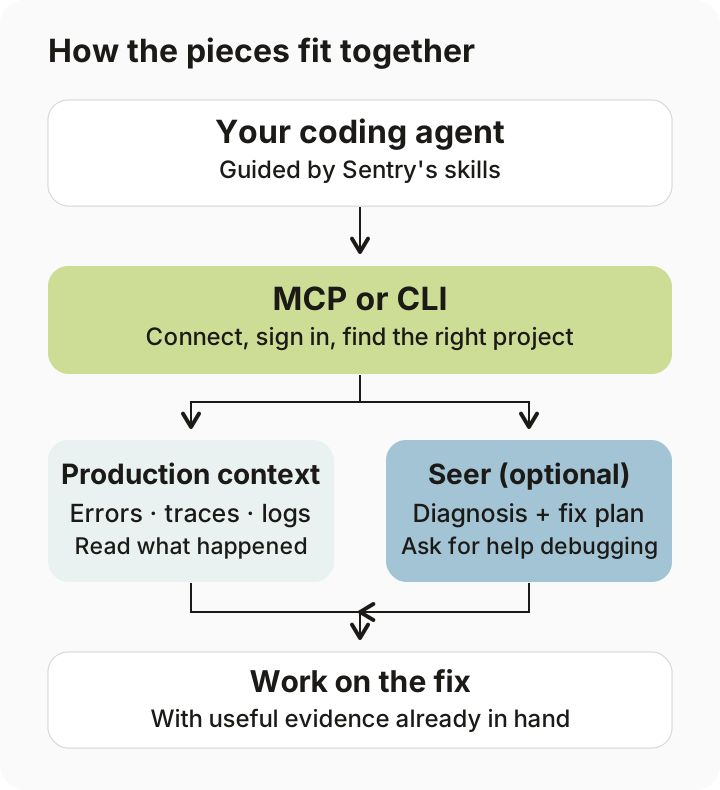
Say you ask your coding agent to fix a production error. The code is on your laptop. The stack trace, logs and affected users are in Sentry. The agent needs both.
Sentry has an MCP server for assistants that call tools, and a CLI for agents that work in a terminal. Both give the agent access to production data. Sentry’s explanation covers when you’d use each.
The CLI can detect the project from local settings, DSNs and project files. So the agent can start from the repo it’s already working in, without asking you to find a project ID.
There are also JSON responses, field selection and error codes the agent can act on. If it only needs a few fields, it doesn’t have to read the entire response. These details are in their agent guide.
Then there’s Seer, Sentry’s debugging agent. A coding agent can ask Seer to investigate the issue, get a diagnosis and fix plan, and use that while changing the code.
Skills + plugins
Now the agent can reach Sentry. How does it know what to do?
The sentry-for-ai repo has eight skills: setup, instrumentation, debugging, stack traces, releases, alerts, OpenTelemetry and Apple snapshots. Each gives the agent instructions for that job.
For setup, that includes checking what’s already installed, avoiding duplicate setup and verifying that telemetry actually arrives. “Install the SDK” is only part of the job.
They also point agents to current SDK documentation, available as Markdown, rather than copying every platform’s setup guide into the skill. The routing file shows how they choose the docs to fetch.
The same source produces plugins for Claude Code, Cursor and Codex. They have development builds, tagged releases and skill evaluations. Updating the instructions is part of shipping the product.
Tool discovery
There are a lot of things an agent could do in Sentry. Loading every tool definition into every conversation would take up context before the agent has even started.
The MCP has 15 possible directly exposed tools, with availability depending on permissions. More operations sit in a searchable catalog: 74 entries, including two deprecated aliases.
The agent can search for an operation, get its schema, then call it. It loads the details when it needs them. Here’s the code.
This is one of the parts I’d spend time reading if I were adding lots of tools to an existing product.
Page context
Inside Sentry’s app, they also changed how the agent understands the page you’re looking at.
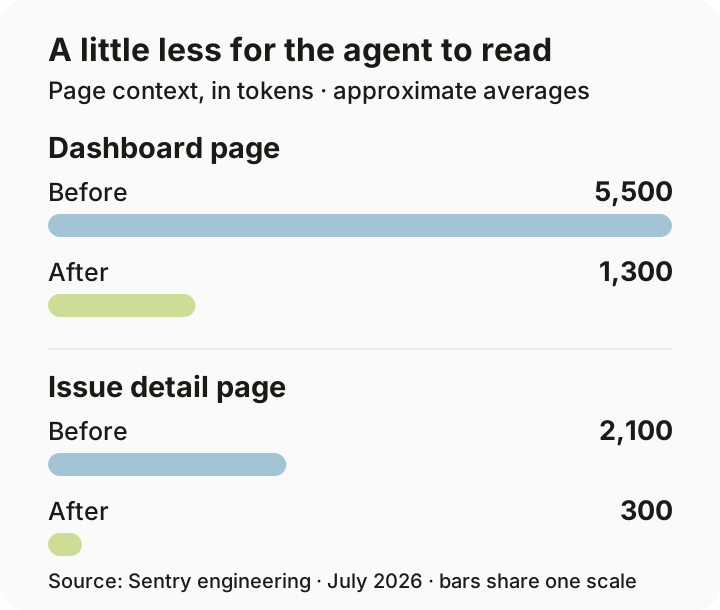
Instead of making it work everything out from an ASCII snapshot, the page supplies structured context: the dashboard, active filters, widgets and other relevant state. The agent can fetch more detail as it goes.
Sentry reports that dashboard context went from about 5,500 tokens to 1,300. Issue-page context went from 2,100 to 300.
I liked Mihir Mavalankar’s write-up of this. The app already knows which filters are active and what its widgets mean. Passing that information to the agent directly makes a lot of sense.
dotagents, Warden + Junior
There are three more projects worth opening.
dotagents manages shared agent settings. A team can keep skills and MCP connections in one place and use them across coding tools. That gets useful pretty quickly when everyone on the team uses a different assistant.
Warden runs code review skills locally or on pull requests. It has a separate verification pass for possible findings before reporting them. The reviewer gets a chance to check its work.
Junior is a Slack agent runtime, with connections to GitHub, Linear, Google Workspace and Sentry. It can persist work and resume after a pause or restart. A long-running task needs that: the process handling the original message might disappear before the work finishes.
These are separate open-source projects. The public repos don’t tell us how Seer’s private runtime is built.
Testing + deployment
The hosted MCP runs on Cloudflare Workers. Its deployment workflow uploads a production version without moving traffic, tests that exact version, then promotes it. After the switch, it tests production again. It can recover the previous version if its deployment fails.
They’re also using agent tracing to debug their own agents. In this engineering post, the team traces a bad search result through the prompt, tool call and backend, then adds an evaluation case.
The people building it
I also wanted to know who was doing the work.
Looking through the full histories, Sentry co-founder David Cramer had the most commits in Toolkit (865), Junior (962) and Warden (400) at the snapshots I checked. He also had 269 Junior commits in the recent 90-day window. That’s a lot of hands-on work from a founder.
For 17 July–14 October 2026, the public history also shows:
| Person | Work in the repos | Commits |
|---|---|---|
| Miguel Betegón | Toolkit: CLI queries, logs and MCP behavior | 186 |
| Burak Yiğit Kaya (BYK) | Toolkit: shared CLI/MCP infrastructure and releases | 102 |
| Aditya Mathur | Toolkit: local development and telemetry tools | 53 |
| Evan Purkhiser | sentry-for-ai: customer skills and plugins | 36 |
| Greg Pstrucha | dotagents; Warden | 37; 47 |
Miguel led Toolkit’s human authorship in that window; Evan led sentry-for-ai, and Greg led dotagents and Warden.
Across those repos, Junior and Sentry’s internal coding skills, I counted 2,217 non-merge commits. 1,275 had bot author names, including release and dependency bots. These counts show public activity; they don’t tell us hours worked or team size. The research snapshot has the method and pinned revisions.
Where I’d start
If I were doing this for my own product, I’d start with one real task. Ask a coding agent to set it up, investigate an error, or change a setting. Watch where it gets stuck.
Does it need a project ID you already have locally? Does it read pages of output for one number? Does it finish setup without checking whether it worked?
Those are small, specific things we can improve. Sentry has shared enough code and engineering detail that we can see how they’re doing it. I’m glad they’re building this in public. I’d love to see more of us sharing the same work for our own products.
Research date: 14 October 2026. Counts use UTC author dates, exclude merges and generated plugin repos, and combine verified aliases for the named contributors. Toolkit includes imported CLI history. Sources are public; I haven’t interviewed the team or inspected private Seer code. Full research snapshot.