
Connect messaging channels
OverviewRun the same agent on WhatsApp, iMessage, Telegram, SMS and your own app.
Let someone text your product the way they’d text a person: a short request, another detail, then “actually, make that tomorrow.” They shouldn’t have to learn a command language or wait for a slow lookup before they can say anything else.
Flow runs that conversation: it reads incoming messages, calls your tools and replies using each channel’s formatting and delivery rules. Its turn handling accounts for double texts, corrections and work that takes longer than a quick reply. Connect through Flow Messaging or bring your own provider.
Choose a channel
Section titled “Choose a channel”Buttons, lists, templates and your own sender.
iMessageText, photos and tapbacks on an iMessage line.
TelegramTry a bot on your phone, then connect your own.
SMSPlain-text conversations through your sender.
Web & app chatKeep your UI and connect Flow’s conversation runtime.
Try it on your phone
Section titled “Try it on your phone”Connect a channel
From the starter project, run:
npx @flow-engineer/flow link --channel telegramnpx @flow-engineer/flow link --channel whatsappnpx @flow-engineer/flow link --channel imessagelink signs you in, sets up the folder and prints a phone link. If a channel is not open
yet, it tells you which ones are available.
Start the agent
npm startRestart after link changes keys, senders or the display name. The starter reads .env at
startup and connects through an outbound event stream, so your laptop needs no public URL
or tunnel.
Send the first message
Open the phone link and write to the agent. WhatsApp and iMessage trial channels reply after you write first.
Check it worked: ask “What’s on the menu?” and look for the get_menu call in the local
playground’s Debug view.
The trial uses shared test numbers. A join code binds your phone to your app; another app’s code moves it. Use your own channel for real customer data.
Choose a provider
Section titled “Choose a provider”| Interface | Connect with |
|---|---|
| Telegram and iMessage | Flow Messaging’s channel definitions |
Flow Messaging or whatsapp() with your provider | |
| SMS | Flow Messaging’s SMS channel or sms() with your provider |
| Your own web or app chat | customUI() with your sending function |
The Flow Messaging adapter covers its senders and connection setup.
Adapt your own provider
Define the channel using callbacks to your provider. In this fragment, replace waClient and
smsClient with the API clients you use:
import { sms, whatsapp } from "@flow-engineer/flow";
const wa = whatsapp({  sendMessage: (to, message) => waClient.send(to, message),  react: (to, messageId, emoji) => waClient.react(to, messageId, emoji),});
const text = sms({  sendMessage: (to, message) => smsClient.send(to, message.text),});
Pass these definitions in createAgent({ channels: [wa, text], ... }). Your webhook adapter
supplies incoming messages with agent.message({ channel, from, message, messageId }).
Providers can also expose carousels, typing, read receipts and other optional capabilities. Flow offers the model only the features the connected provider supports.
How a turn works
Section titled “How a turn works”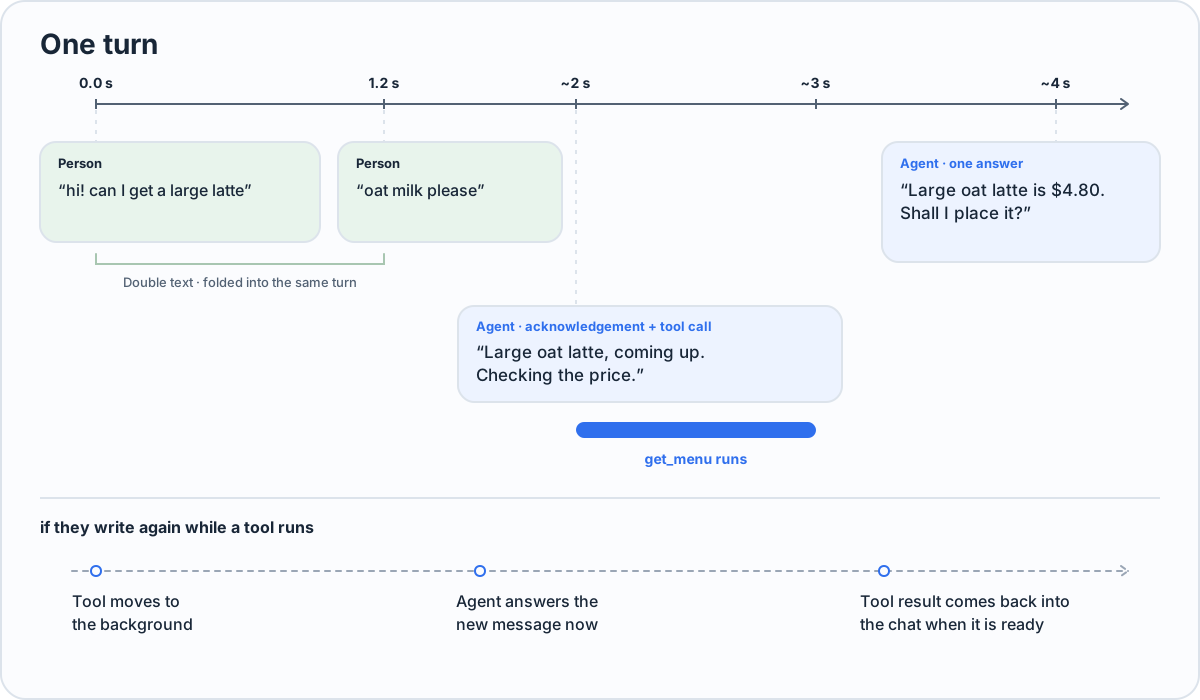
| What happens | How Flow responds |
|---|---|
| Several quick messages arrive | Folds them together; an in-flight model step restarts with the new context |
| A tool takes time | Sends an acknowledgement with the tool call and waits for the result |
| The person writes during a tool call | Reads the message at once; the tool continues in the background |
| A tool passes its deadline | Moves it to the background; the default is 60 seconds |
| The model writes without using a send tool | Reminds it once to send; does not repeat text already delivered |
The agent gets a send tool for each channel and answers where the person last wrote. The playground lets you exercise this behavior without sending to a real provider.
Channel formatting and validation
Section titled “Channel formatting and validation”WhatsApp can use buttons, lists, replies, reactions and declared templates. SMS uses plain text segments. Your custom UI can define additional fields.
Content is checked before sending. If a message does not fit the platform’s limits, the agent receives the refusal and can send again. The playground and hosted tests apply the same limits.
Reply button ids
Section titled “Reply button ids”Use labels for simple buttons, or { id, label } when taps must be distinguished.
buttons: [ { id: "details:latte", label: "Details" }, { id: "details:chai", label: "Details" },],A tap is delivered as choice: { id, title }. Ids are 1–64 bytes and must be unique within
the message and across carousel cards. Labels can repeat. Check the channel’s info.buttonIds
before relying on ids: some providers return only a label.
Use beforeSend for your own final-message checks. Its replacement is what gets validated,
sent and recorded. Hook reference
One person across messaging channels
Section titled “One person across messaging channels”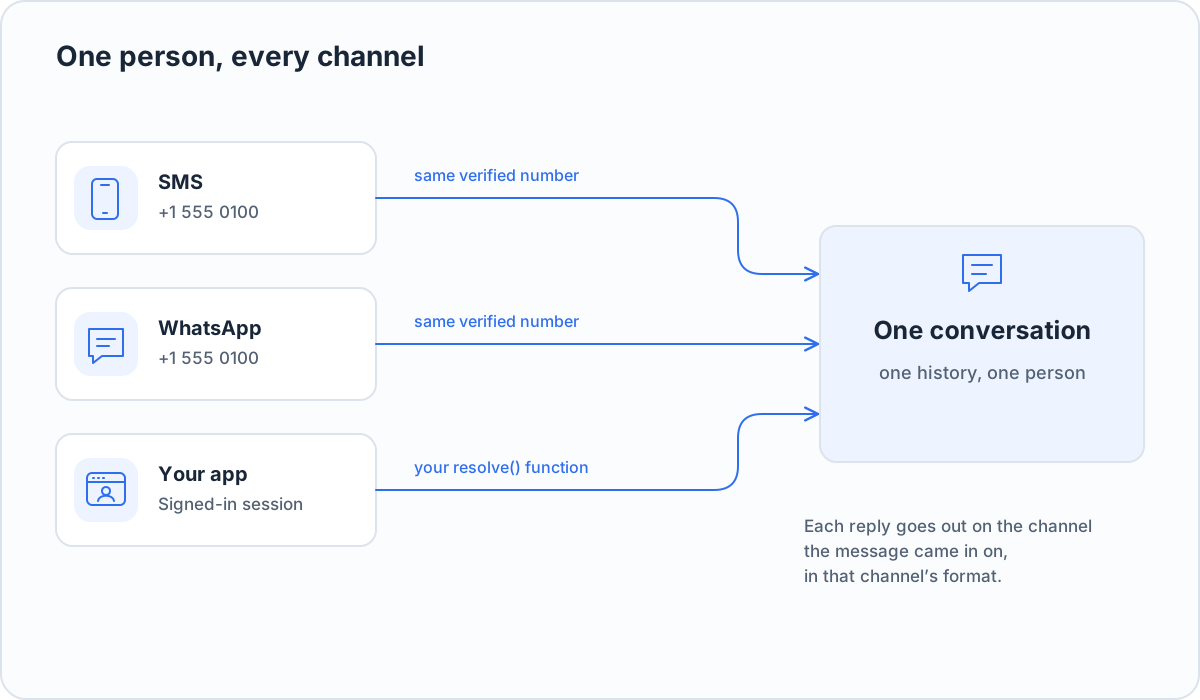
SMS and WhatsApp numbers are normalized to E.164. For example, +1 555 010 0100 and
15550100100 identify the same phone.
For other interfaces, supply resolve to map the verified channel identity to your account
key. The tool receives that key as context.key and a stable identity as context.person.
National phone numbers and identity formats
Set defaultCountryCode: "+91" if a provider supplies national numbers such as
098765 43210. On phone channels other than WhatsApp, the configured country code is applied
and the national trunk zero is dropped. Without it, bare digits are read as international.
context.person is key:<resolved key>, else phone:<E.164>, else <channel>:<address>.
context.key is the exact resolved account key or null. Flow does not guess that an app
user and a phone number are the same account.
What the agent knows about the person
Section titled “What the agent knows about the person”Keep account lookups in profile. Flow exposes them through get_user_profile, which the
agent calls when needed.
In this configuration fragment, members is your application’s account service:
resolve: ({ channel, address }) => members.idFor(channel, address),profile: async ({ person }) => members.profile(person),A tool you define with the same get_user_profile name takes precedence. In scenario tests,
the profile is simulated from the test world rather than read from your real backend.
Use context(conversationId) only for small facts at hand: it runs before every turn, so a slow
lookup there delays every reply. Shared facts such as opening hours and policies can live in
the agent’s instructions.
Time zones
Section titled “Time zones”The agent sees the person’s time when their zone is known. Otherwise it sees the business’s
timeZone, marked as the business’s zone. It never assumes the two are the same.
Set a known person’s zone from your backend:
await agent.setTimeZone({ to: { channel: "sms", address: "+15550100100" }, timeZone: "Asia/Kolkata",});This returns { status: "set" }, or { status: "refused", reason: "unknown_person" } for a
person who has not written yet. An invalid IANA zone throws.
The person can also name their zone in the conversation. A reminder “at 9 tomorrow” requires one; “in 30 minutes” does not. A no-contact rule “until Friday” uses the latest possible end of Friday, UTC−12, so it does not lift early.
Thanks, we read every comment.